Feeling overwhelmed by Azure (AI, ML, and Data Science)? You're not alone.
If you’re working with Microsoft Azure, you’ve probably seen a wide range of services — like AutoML, OpenAI, Cognitive Services, and many more. With so many options available, it can be hard to decide which tools are best suited for your specific task. Often, the abundance of choices leads to confusion, making it difficult to see how everything fits together or where to start.
That’s why I created a simple tree diagram to show the full picture of Azure’s AI, ML, and Data Science ecosystem.
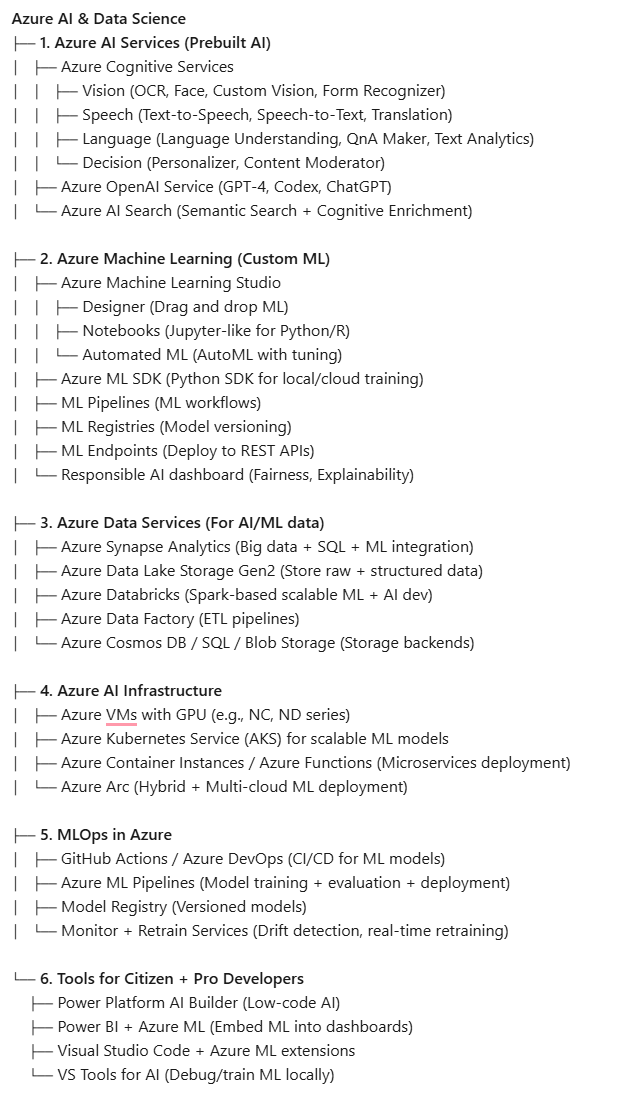
Here’s a short description of Azure AI, ML, and Data Science services from the above-mentioned tree view:
1. Azure AI Services (Prebuilt AI)
- Azure Cognitive Services – Vision provides capabilities for image analysis, OCR, face detection, and building custom image classifiers.
- Azure Cognitive Services – Speech enables text-to-speech, speech-to-text, and real-time speech translation.
- Azure Cognitive Services – Language offers features like language understanding (LUIS), sentiment analysis, named entity recognition, and QnA Maker.
- Azure Cognitive Services – Decision helps build personalised experiences (with Personalizer) and detect offensive or inappropriate content (Content Moderator).
- Azure OpenAI Service provides access to GPT-4, Codex, and ChatGPT for natural language processing, text generation, and code completion.
- Azure AI Search is a search-as-a-service platform with semantic ranking and AI enrichment to extract insights from content.
2. Azure Machine Learning (Custom ML)
- Azure Machine Learning Studio — web-based UI for building models using drag-and-drop (Designer), notebooks (Jupyter-style), and AutoML.
- Azure ML SDK — Python SDK for training, validating, and deploying machine learning models in code.
- ML Pipelines enables the creation of reusable, automatable ML workflows from data prep to deployment.
- ML Registries stores and versions trained machine learning models for reproducibility and reuse.
- ML Endpoints — deploy machine learning models as REST APIs for real-time or batch inference.
- Responsible AI Dashboard provides tools to assess fairness, interpretability, and performance to ensure ethical AI.
3. Azure Data Services (for AI/ML Data)
- Azure Synapse Analytics combines big data and SQL data warehousing with built-in integration to ML tools.
- Azure Data Lake Storage Gen2 is optimised for analytics workloads, supports both structured and unstructured data.
- Azure Databricks — Apache Spark-based platform for scalable data science and machine learning.
- Azure Data Factory — cloud-based ETL (Extract, Transform, Load) service to move and prepare data.
- Azure Cosmos DB / SQL / Blob Storage — back-end storage services for NoSQL, relational, and unstructured data.
4. Azure AI Infrastructure
- Azure GPU VMs — high-performance virtual machines with GPU support for deep learning training.
- Azure Kubernetes Service (AKS) manages containerised ML models and enables scalable inference.
- Azure Container Instances / Azure Functions — serverless or container-based environments to host lightweight ML services.
- Azure Arc — extend and manage Azure services across hybrid and multi-cloud environments.
5. MLOps in Azure
- GitHub Actions / Azure DevOps automates ML model CI/CD workflows for training, testing, and deployment.
- Azure ML Pipelines (MLOps) manages and automates multi-step ML workflows, from data ingestion to deployment.
- Model Registry — central storage for tracking and managing model versions.
- Monitor + Retrain Services tracks model drift and automates retraining when accuracy drops.
6. Tools for Citizen + Pro Developers
- AI Builder (Power Platform) — low-code tool to build and deploy AI models in Power Apps and Power Automate.
- Power BI + Azure ML — integrate machine learning predictions into interactive BI dashboards.
- VS Code + Azure ML Extensions enables local development and remote deployment of ML models using VS Code.
- Visual Studio Tools for AI offers debugging and deep learning model development tools inside Visual Studio IDE.
Azure has a wide range of services for AI, ML, and data, but without a clear structure, it’s easy to get lost. That’s why I created this breakdown. It’s meant to help you see how everything connects and to make it easier to choose the right tools for your projects.
If you think it is helpful, feel free to share your thoughts or connect. Then, I’ll be sharing more hands-on breakdowns on Azure AI soon.